



How to Register Nintendo Switch Games
Whether you’re looking to earn points for the My Nintendo program or wanting to unlock content for a specific game, it’s useful to know how to register Nintendo Switch games. Here’s how it works.
Previously, Nintendo’s My Nintendo program only rewarded players who purchased digital versions of games from the eshop, but that’s since been changed. You can now register physical games, too, which allows you to earn reward points.
It also qualifies you to unlock special content for certain games, as is the case for unlocking Piranha Plant for free in Smash Bros. Ultimate. We’ve got a detailed guide for that here if you’re wanting to find out about that specifically.
If it wasn’t already obvious, digital games that you have downloaded on your Switch account are automatically registered. You don’t have to worry about this process.
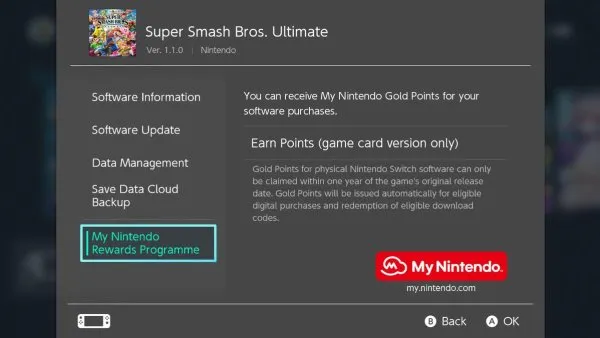
However, you’ll need to manually register your physical game cartridges. To do so, insert the game cartridge, then select the game’s icon on the home screen and press the + button on your Joy-Con. Look for the “My Nintendo Rewards Program,” then select “Earn Points.”
In brief:
- Highlight the game’s icon
- Press + and look for the “My Nintendo Rewards Program”
- Select “Earn Points”
Do note that you can only perform this procedure once per copy of the game, so if you buy a game used and the previous owner already registered it, you’re out of luck. There’s also a time limit: you have two years following the game’s release date in your country to complete registration.
That’s all the information you should need about how to register Nintendo Switch games. For more handy tips on Nintendo Switch, search Twinfinite.
TDLR;
Question: How do you register Nintendo Switch games?
Answer: Insert the cartridge, highlight the game’s icon, press + & look for “My Nintendo Rewards Program,” select “Earn Points.”










Updated: Dec 13, 2018 03:09 pm