Forgot password
Enter the email address you used when you joined and we'll send you instructions to reset your password.
If you used Apple or Google to create your account, this process will create a password for your existing account.
This site is protected by reCAPTCHA and the Google Privacy Policy and Terms of Service apply.
Reset password instructions sent. If you have an account with us, you will receive an email within a few minutes.
Something went wrong. Try again or contact support if the problem persists.
Rooms and Exits Toy Factory
Screenshot by Twinfinite

Rooms & Exits: Christmas Rescue Walkthrough Guide

Here's how to complete the Christmas Rescue mission in Rooms & Exits!

Rooms & Exits mobile puzzle game is full of surprises and truly challenging puzzles. In the case of the Christmas Rescue update, you’ll have only 40 minutes to complete the mission, so be sure to follow this guide for all the quick answers to the puzzles. If you follow all the steps listed below, you’ll be able to complete the whole thing in under 30 minutes.

Recommended Videos

Operation: Rescue Santa

The Xmas chapter of Rooms & Exits begins with Fiona and Daisy learn from Tinsel that Santa has been mistakenly locked inside the freezer, so he might not make it in time for the holidays. On top of that, Daisy’s favorite toy, a plush bunny, hasn’t been delivered from the Toy Factory yet, making the little girl sad. So, to solve all this mess, you need to complete the following objectives:

  • Solve all the puzzles at the Toy Factory, Santa’s room, and the deer stables.
  • Find and use the nine tiles that are needed to unlock the freezer and save Santa.
  • Pick up a plush bunny toy and send it in time for the holidays to make Daisy happy.

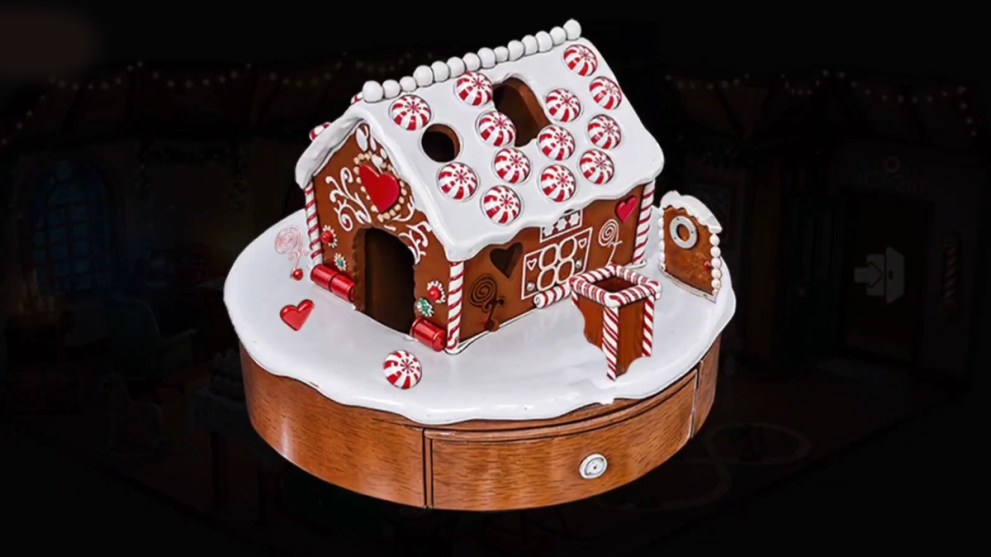
Ginger Bread House Puzzle

Ginger Bread House Puzzle
Screenshot by Twinfinite

The very first thing that you need to solve is to complete the Ginger Bread puzzle that can be selected from the Santa’s festive table. Here’s how to solve it:

  1. Pick up a chimney and place it into the biggest slot on top of the roof.
  2. Insert the door into the empty entrance slot.
  3. Pick up a small candy at the entrance and place it inside the empty slot on the edge of the roof.
  4. Pick up a little heart-shaped candy at the entrance and insert it into the empty slot next to a window.
  5. Lastly, insert a swirly flower candy and place it right under the heart-shaped candy.

Once the gingerbread house is complete, you can open the drawer under the house and pick up your first tile. Then, tap the coffee table on the bottom of the screen with milk and cookies, and pick up a second tile.

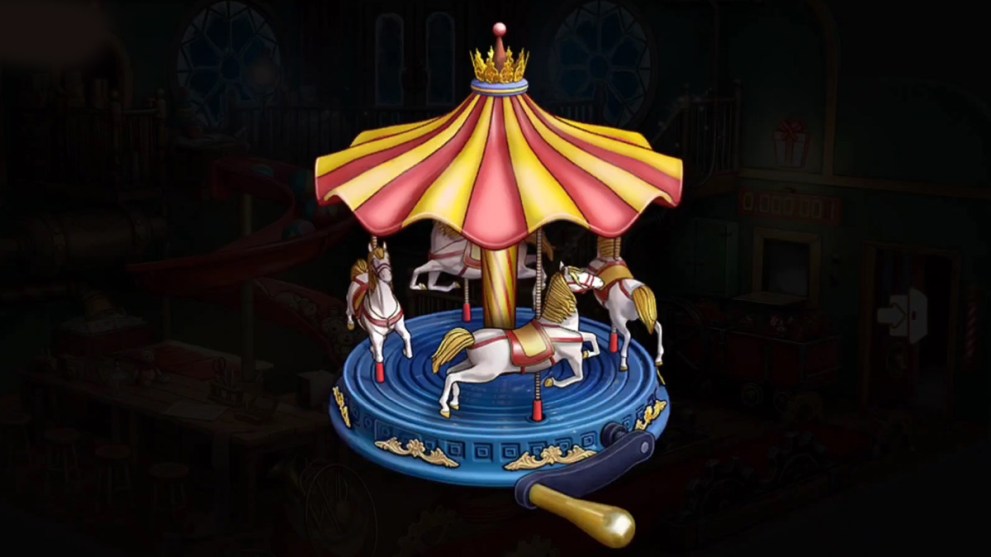
Merry-Go-Round Puzzle

Merry-Go-Round Puzzle
Screenshot by Twinfinite

Return to the Toy Factory and pick up a horse and a handle from the bag at the bottom of the screen. Then, follow these steps:

  1. Tap the carousel on the table and open your inventory.
  2. Tap the horse part and insert it into the missing slot of the merry-go-round.
  3. Repeat the same action with the handle.
  4. Tap the handle to rotate the merry-go-round and pick up another tile from the drawer underneath.

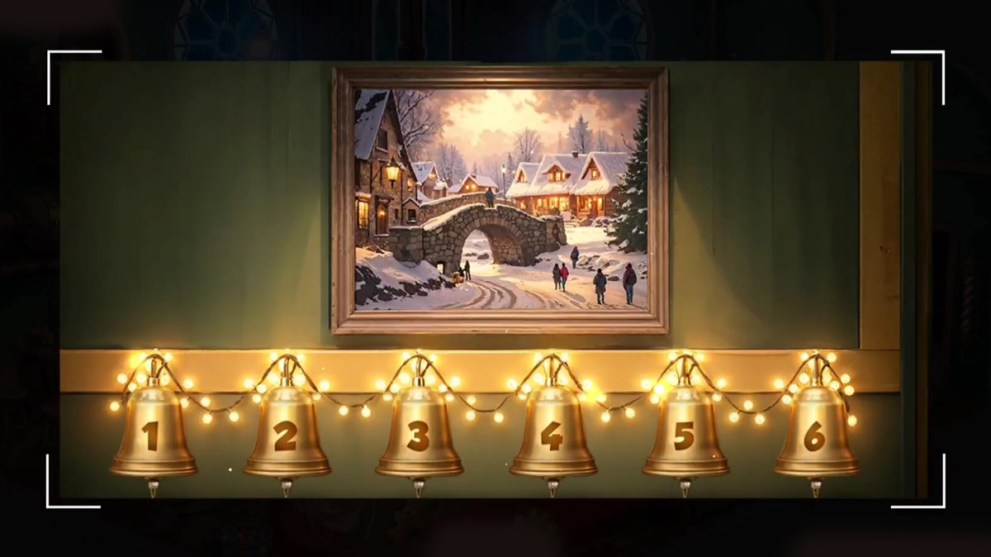
Painting With the Bells Puzzle

Painting With the Bells Puzzle
Screenshot by Twinfinite

After that, pick up a gift box from the table and a card with a code on it that says: 333 333 35123. Remember this number or write it down, as you’ll need it for the next puzzle:

  1. Tap the painting over the left door to reveal a series of numbered bells.
  2. Now tap the bells according to the numbers on the gift card.
  3. When the painting disappears, pick up the fourth tile from the niche.

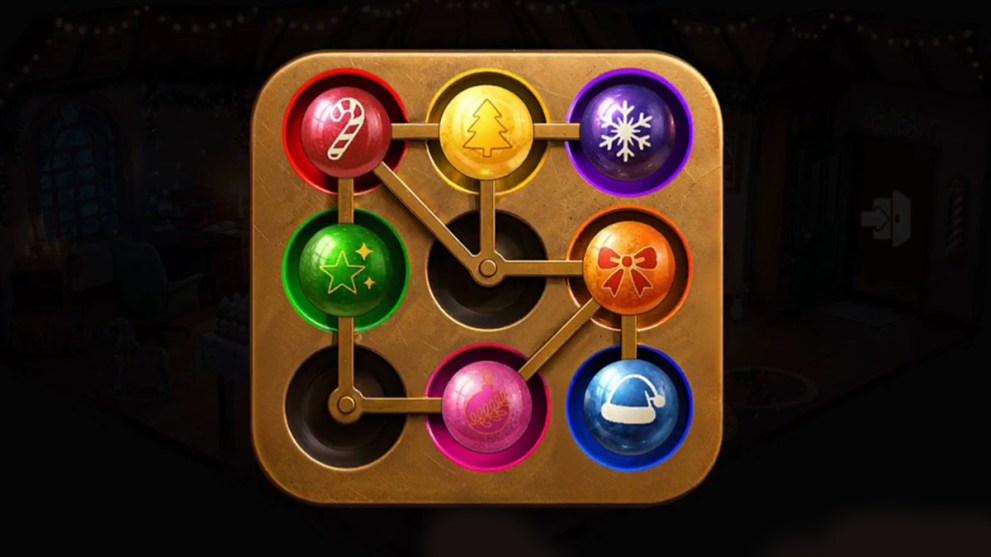
Color Xmas Tree Toys Puzzle

Color Xmas Tree Toys Puzzle
Screenshot by Twinfinite

Now go to the right room, which is the deer stable, and pick up some firewood from the basket on the floor. Go back to the Santa’s room and tap the hearth, then tap the box located in the bottom left corner of the screen. Use these tips to solve the next puzzle:

  1. You need to place the toys in the niches that correspond to their colors, as shown in the image above.
  2. Begin by placing the bottom and right side toys into their color niches.
  3. Push the green, red, and yellow toys to the top by creating space below them, temporarily adjusting the pink and orange toys.
  4. Once you’ve placed the top and left side toys into their proper slots, you can bring back the rest into their correct positions.

But that’s not it, as you need to tap the box at the hearth again to reveal a giant blue button, which you need to deposit, as well as a pair of scissors, into your inventory for future puzzles.

Festive Circlet Puzzle

Festive Circlet Puzzle
Screenshot by Twinfinite

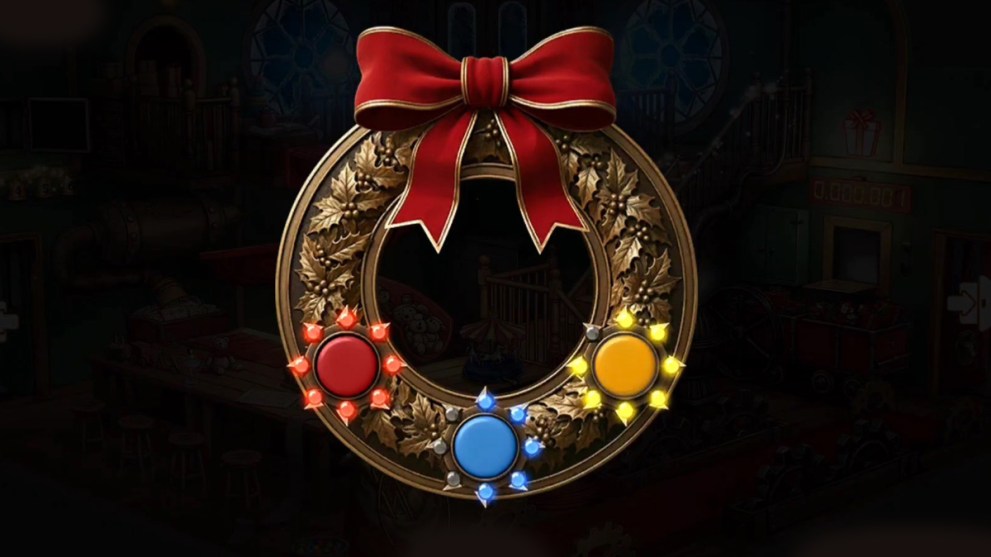
Go back to the Toy factory room and tap the festive circlet that hangs on the door at the balcony (top of the screen). Once the circlet reveals a free slot, do this:

  1. Insert the blue button that you picked up earlier into the missing slot.
  2. Now you need to investigate the colored garlands on the Xmas tree in the deer stable.
  3. This should help you solve the circlet puzzle, so tap the red button on the circlet until all red lights are activated.
  4. Tap the blue button until half of the blue lights are activated.
  5. Lastly, tap the yellow button until all the yellow lights are activated except the very last one, as shown in the image above.

The Hearth Puzzle

The Hearth Puzzle
Screenshot by Twinfinite

Once the balcony door unlocks, you can click the inside area to pick up another tile from the Xmas tree, a bunny toy, and a matchstick box. Then, follow these steps:

  1. Enter the Santa’s room and tap the hearth.
  2. Open your inventory and place the firewood into the hearth.
  3. Then, use your newly acquired matches to set the wood on fire.
  4. This simple action will reward you with another tile.

The Nonogram Puzzle

The Nonogram Puzzle
Screenshot by Twinfinite

Tap the large Xmas tree near the hearth in the Santa’s room and tap a small green gift box under the tree. This will reveal another puzzle to solve:

  1. Start solving this Nonogram by tapping the five horizontal checkboxes in the center: 2 x 5, 4 x 5, 4 x 5, 4 x 5, 2 x 5
  2. Then, repeat the same number on the line above.
  3. Tap two more checkboxes of the vertical central line underneath: 4 x 3, 4 x 1
  4. Lastly, check the rest of the sequences: 1.1 x 4, 3 x 4 on both of the vertical lines.
  5. Pick up the solved Nonogram and return to the deer stable.
  6. Tap the control panel of the Santa’s sled and check exactly the same boxes on the red puzzle as you solved it on the green Nonogram.
  7. As a result, you’ll be rewarded with the next tile.

Typing Machine Puzzle

Typing Machine Puzzle
Screenshot by Twinfinite

In the Santa’s room, you need to tap the typing machine on a small table in the top-left corner of the screen. After that, do the following:

  1. Tap the letter to Santa and watch a dialogue between Fiona and Tinsel.
  2. Take note of the name assigned to this letter: Aida Sanyy.
  3. Tap a pile of letters on the other side of the typing machine.
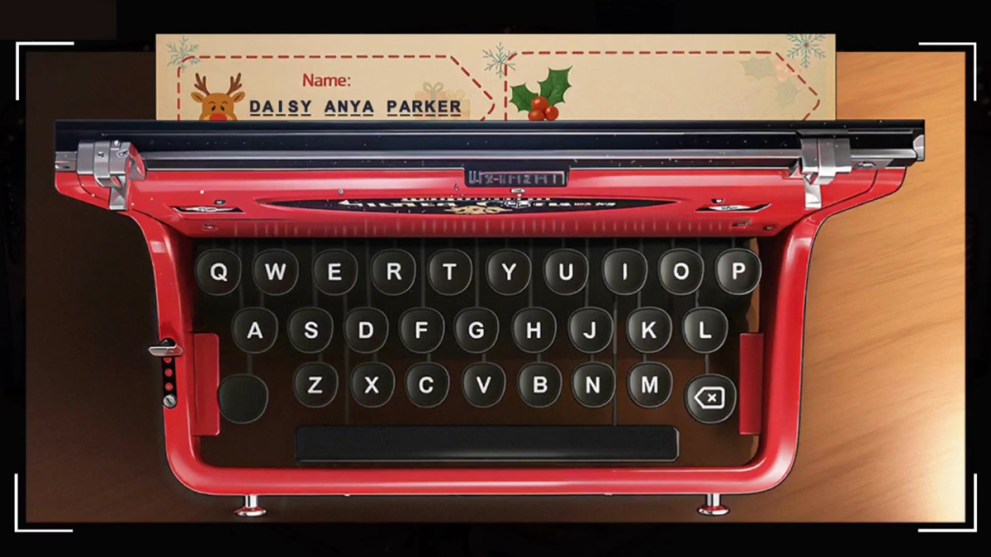
  4. This time, take note of the letter that’s assigned to Daisy A. Parker.
  5. Tap a photo of a girl with a bunny toy under the typing machine.
  6. After watching another dialogue, tap the typing machine to write a letter.
  7. The correct name of the girl is “Daisy Anya Parker,” so type it into the letter’s heading.
  8. This will reward you with the eighth tile.

Send the Final Gift

Send the Final Gift
Screenshot by Twinfinite

All that’s left to be done is to send out a gift to Daisy of her favorite bunny toy, which you should already have in your inventory, if you’ve been following all the steps listed above. Complete this chapter:

  1. Go to the Toy Factory and tap the gift terminal, which is located next to the stable entrance.
  2. Open your inventory and use the scissors to cut out the name of the girl from the letter that you typed previously.
  3. Put a bunny toy in the gift box and place the gift box into the terminal.
  4. Apply the girl’s name tag to the gift box via the combine command.
  5. Tap the lever to send the gift to the girl.

Save Santa From the Freezer

Save Santa From the Freezer
Screenshot by Twinfinite

As a reward for sending the girl her favorite toy, you’ll receive a special letter from the gift terminal. Open this letter to receive the very last ninth tile. Now you can save Santa by following these steps:

  1. Enter the Santa’s room and tap the other door next to a typing machine that’s been locked all this time.
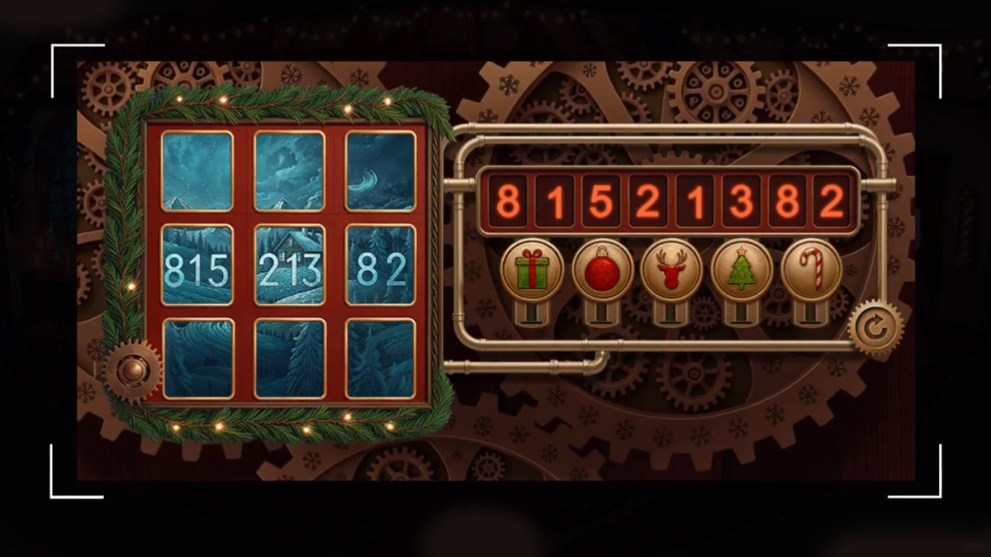
  2. Insert all nine tiles into the slots of the lock and enter the numbers as listed in the reveal form: 81521382
  3. Note that each of the symbols corresponds to a single number in the following order:
    • Red toy = 8
    • Gift box = 1
    • Xmas tree = 5
    • Candy cane = 2
    • Deer = 3
  4. As a result, Santa will be freed from the freezer, and Christmas will be saved right on time.

Lucy’s Missing: Help Find the Pup

After helping Daisy get her favorite bunny toy, you can help her find her puppy named Lucy after a debacle of a broken gnome toy. Just as before, you need to collect a set of tiles by solving puzzles around the house, which will eventually lead you to the location of the missing puppy. This is an optional mission, but definitely worth completing due to a reward of 50 gold.

Garage Tools Puzzle

Garage Tools Puzzle
Screenshot by Twinfinite

Before investigating the disappearance of the pup, you need to help get Lucy inside the house. After investigating the flower pots, do the following:

  1. Tap the garage door to enter the lock code: 3-1-6-4
  2. When the door rolls up, enter the garage and pick up a wrench from the floor.
  3. Then, pick up a hammer from the shelf on the right side of the screen.
  4. Lastly, pick up a small knife from the ladder next to a car.
  5. Now you can tap the set of tools that are hanging on the wall.
  6. Insert all three missing tools back into their slots to complete the puzzle.
  7. Also, be sure to remember or write down the four numbers on the tools.
  8. Tap the drawer under the tools and enter the code: 9-1-3-8
  9. Pick up a key from the backyard house once the drawer opens up.

Car Collection Puzzle

Car Collection Puzzle
Screenshot by Twinfinite

Check out a pack of wet napkins on the table to your right in the garage. Pick it up and follow these steps:

  1. Use the napkin to clean the dirty table, revealing an image of a vintage car.
  2. Pick it up as the first tile required for finding the lost puppy.
  3. Now tap the car poster on the opposite side of the garage and remember the color patterns on it.
  4. After that, tap the car collection that’s hanging on the wall right next to the poster.
  5. Insert the missing car into the empty slot and rearrange the cars, as shown in the image above.
  6. Pick up an emergency key that appears in the niche behind the toy cars.
  7. Now tap the emergency kit with a red cross on the wall just above the table.
  8. Use the key to unlock the kit and pick up a bottle of 70% Isopropyl Alcohol, gauze, and a bandage box.

Band-Aid Puzzle

Band-Aid Puzzle
Screenshot by Twinfinite

Leave the garage and open your inventory. Use the dismantle and combine commands to create the following:

  1. Dismantle the bandage box to create a band-aid.
  2. Combine gauze and alcohol to create a wet gauze.
  3. Use the wet gauze on the girl’s injured arm.
  4. Apply a band-aid to a clean wound.
  5. This action will reward you with a bolt, which should help you open the gate.

Gate Lock Puzzle

Gate Lock Puzzle
Screenshot by Twinfinite

Tap the wooden gate next to a house and insert the bolt into the left slot. Then, follow these steps:

  1. Rotate each of the six sections of the lock so that the ins and outs connect precisely as shown in the image above.
  2. Once the connections in the lock have been created, let the bolt pass through to the other end unhindered.
  3. This will unlock the gate, so you can finally enter the backyard.

Backyard Lock Puzzle

Backyard Lock Puzzle
Screenshot by Twinfinite

Carefully investigate the backyard and pick up Lucy’s pendant from the ground, as it contains the code from the pup’s locker. After that, tap Lucy’s booth and do this:

  1. Pick up a feeding bowl that’s full of water near the booth.
  2. Tap the locked section in the back of the booth.
  3. Enter the code from Lucy’s pendant to unlock: 4-9-1-0
  4. Pick up a box of dog cookies from the locker

Find Puppy in the Backyard House

Find Puppy in the Backyard House
Screenshot by Twinfinite

Return to the backyard view and tap the door of the small house, which requires a key that you’ve picked up from the garage earlier. Here’s what you need to do:

  1. Open your inventory and use the key from the garage.
  2. Tap the lock and enter the small house to see Lucy inside, who’s clearly dehydrated.
  3. Select a feeding bowl full of water from your inventory and tap the puppy.
  4. Lucy gets better and reveals that she found a tube of glue to fix the broken gnome toy.
  5. Now you must reward Lucy with a treat, so give her some dog biscuits.

That’s everything you need to know on how to complete the Rooms & Exits: Christmas Rescue walkthrough. For more guides, check out Escape Simulator 2: Dracula’s Castle Walkthrough and Baby Steps Walkthrough Guide: The Fastest Way Up.


Twinfinite is supported by our audience. When you purchase through links on our site, we may earn a small affiliate commission. Learn more about our Affiliate Policy
Author
Image of Serhii Patskan
Serhii Patskan
Serhii is the Writer at Twinfinite. He's been writing for the gaming industry since 2015. Before that, he's been writing for various outlets and playing video games, which eventually turned into a passion. The video games that have contributed the most to his enthusiasm for writing about this industry are Minecraft, Magic: The Gathering, Dark Souls, and The Elder Scrolls V: Skyrim.