



Use on PC and Xbox One

Though it’s not something that Sony went around promoting prior to its release, it didn’t take long for players to discover that the PlayStation VR (PSVR) could be used on both PC and the Xbox One. Though you won’t be able to use it for any VR experiences, it does allow you to play your favorite games from these platforms in the PSVR’s cinematic mode.
All that it requires you do is to simply plug the HDMI cable that should go into the back of your PlayStation 4 from the Processor box into either your Xbox One or PC. It doesn’t have the head-tracking feature that PS4 games do in cinematic mode, but it’s a neat little use of your headset all the same.
Hulu’s Customizable Cinematic Locations

With the release of PSVR, Hulu provided a PSVR-compatible version of their app which allows used to change the cinematic mode settings when they’re watching whatever movie or show they choose. This means that the area surrounding the screen can be switched upon through a number of different options.
Fancy feeling like you’re in an actual movie theater with boxes of popcorn and virtual drinks you can interact with? Well, Hulu thought of that. Alternatively, you can change to a virtual living room if you’d prefer a more homely feel to your VR surroundings. You can also change the size of the virtual screen you’re watching your content on. While this is currently not a feature available in the PSVR’s standard cinematic mode, it’s certainly something we’d love to see incorporated into the standard PSVR experience.
Watch Your Own 360 Video Files

It wasn’t just the Hulu app that got a VR-based update, either. The PS4’s own Media Player app was updated on the release day of PSVR which added compatibility for 360-degree videos and photos. This means that if you’ve got a 360-degree camera and have been making good use of it on your adventures, or just have a favorite 360 video you want to check out in VR, the PSVR will let you do just that.
You’ll have to make sure that the Media Player is updated to version 2.50 to be able to make use of this, and you’ll also need to ensure that the file type is correct for your video or photo files. Then, just throw the files onto a pen drive and you’ll be good to go.
Different Viewpoints in Multiplayer

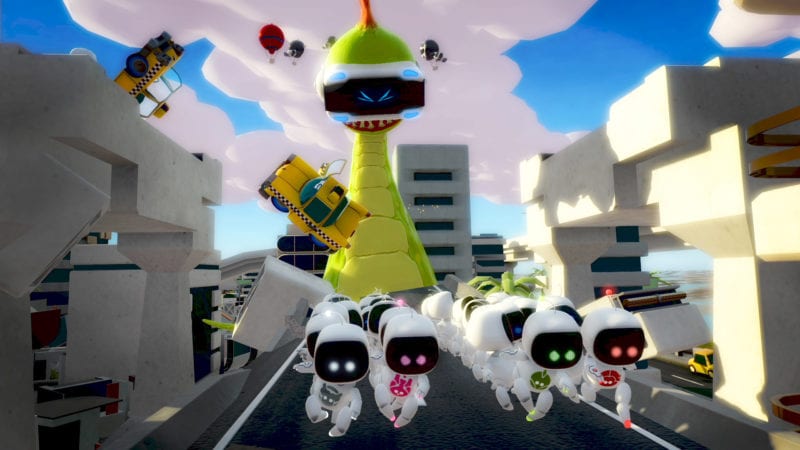
Though it’s currently only a feature utilized in Playroom VR, PSVR opens up a new way to experience multiplayer games thanks to what are essentially different screens. As the player using the VR cannot see what’s shown on the TV screen, Playroom VR makes good use of this. Players looking at the TV will see the image you can see above, whereas the VR player will be looking down from the viewpoint of the scary dragon thing chasing them.
By utilizing this unique element of using a VR headset, Sony has not only proven that VR can be enjoyed as part of a multiplayer experience, but also built a sturdy multiplayer foundation for other developers to build upon for future VR titles. It may only currently be present in Playroom VR, but it’s a neat way to make use of your PSVR with your friends and family.
Sharing the TV

As you’re using your headset, the same image is displayed on the TV (except for those that utilize it for multiplayer experiences). While this may seem pretty straightforward, you’re actually able to change the channel on the TV without it messing with your VR experience.
This not only means that you can enjoy Rez Infinite, Until Dawn: Rush of Blood, or any other VR game while your loved one watches their favorite show on TV, but you can quite literally watch or play anything you want on your PSVR headset without getting in the way of someone else’s viewing habits. Just put the headset on and pop the earphones in and you’ll be away in your own little immersive world. Perfect!









Updated: Nov 1, 2016 01:55 pm